How it Works

These are the steps involved for learners taking the MyExcelSkills online Microsoft Excel training course.
-
Select Module and Level
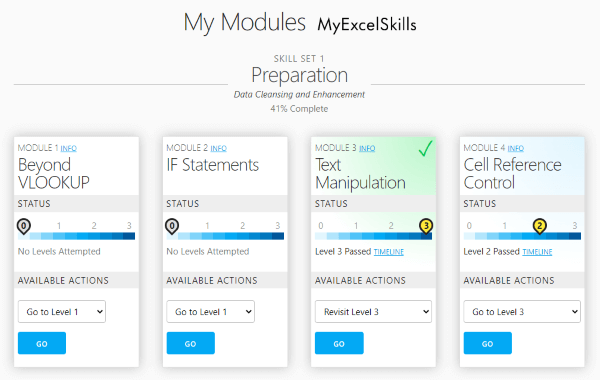
You are able to complete the MyExcelSkills online course at your own pace, choosing your own route through the programme.
There are 8 MyExcelSkills learning modules, which can be studied in any order:
- Beyond VLOOKUP
- IF Statements
- Text Manipulation
- Cell Reference Control
- PivotTables
- SUMIFS, COUNTIFS etc.
- Conditional Formatting
- Professional Touches
If you choose, you can have more than one module in progress simultaneously.
Each module has 3 levels:
- Foundation
- Intermediate
- Advanced
You can mix and match levels according to your confidence with each learning module. For example, on reviewing the course content for Module 1 (Beyond VLOOKUP), you might feel confident using
VLOOKUPand so start decide to start that module at Level 2.You can easily drop back a level or skip forward a level for any module at any time.
-
Study Learning Content and Practise
For every level of each module, MyExcelSkills offers well-written guidance to equip you with the subject knowledge required in order for you to pass the test (see step 3 below). To assist your learning, you will also always be provided with an Excel file containing examples of the formulas and concepts covered.
This sample dynamic array formulas guidance (opens in new window) gives a feel for the style of content.
-
Download and Complete Test Spreadsheet
When you’ve digested the learning content, you’re ready to attempt the test.
Download a real Microsoft Excel (.xlsx) file containing data and blank answer cells ready for you to complete.
You have 5 minutes to complete the test. The clock starts when you click to download the test file.
Save your completed spreadsheet ready to upload back to MyExcelSkills.
-
Upload Spreadsheet and Receive Instant Feedback
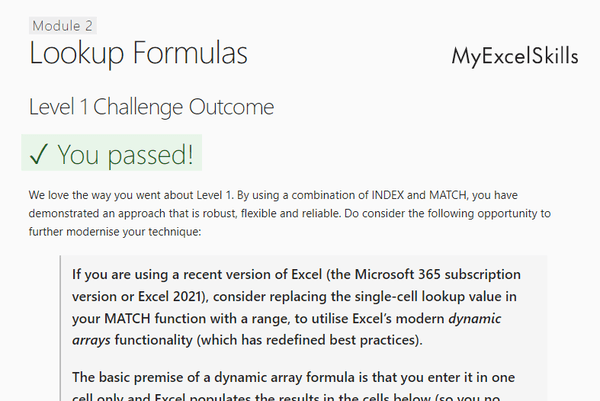
Upload your completed test file and MyExcelSkills automatically marks it.
MyExcelSkills immediately informs you whether you’ve passed or not, and provides specific, tailored feedback according to the approach you have taken.
When you have passed all 8 modules at a particular level (or higher), your certificate for that level becomes available to download from your home screen Dashboard page.